Best Note-Taking Tablets with Pen That Boost Productivity
You get a smooth, paper-like feel on tablets with 300 ppi ePaper or 90Hz low-glare LCD screens, ideal for journaling, calligraphy, and note-taking. Choose models with 8,192–16,384 pressure levels, battery-free pens, and TÜV-certified eye protection, like the Kindle Scribe or reMarkable Paper Pro. Fast AI conversion, offline use, and long battery life boost efficiency. Many support cloud sync, palm rejection, and textured displays for authenticity-discover which ones match your workflow best.
We are supported by our audience. When you purchase through links on our site, we may earn an affiliate commission, at no extra cost for you. Learn more. Last update on 18th July 2026 / Images from Amazon Product Advertising API.
Notable Insights
- High-resolution, low-glare displays with paper-like texture enhance readability and reduce eye strain during long writing sessions.
- Advanced styluses with high pressure sensitivity and battery-free design ensure precise, natural writing and consistent productivity.
- Devices with low latency and 90Hz+ refresh rates deliver smooth inking, minimizing lag for efficient note-taking and sketching.
- Ample internal storage and offline functionality support extensive note organization, AI tools, and seamless document access without cloud dependency.
- Long battery life and fast charging minimize downtime, while AI-powered features like handwriting conversion boost overall productivity.
Lenovo Idea Tab 11″ 2.5K 90Hz

If you’re someone who takes handwritten notes daily or enjoys sketching diagrams while studying, the Lenovo Idea Tab 11″ 2.5K 90Hz stands out with its responsive 11″ 2.5K IPS display and included Tab Pen, delivering sharp, paper-like precision for journaling, math equations, or quick annotations. I love how the 90Hz refresh rate makes inking feel fluid, while the TÜV-certified screen reduces eye strain during long sessions. The 72% NTSC color gamut keeps sketches vibrant, and with Lenovo AI Note, Squid, and Nebo preloaded, I switch seamlessly between handwriting, formatting, and calculations-no extra apps needed.
Best For: Students, note-takers, and visual learners who want a responsive, pen-enabled tablet for studying, sketching, and content consumption.
Pros:
- Crisp 11″ 2.5K display with 90Hz refresh rate and TÜV-certified low blue light for comfortable, fluid writing and viewing
- Includes Tab Pen and comes preloaded with powerful note-taking and calculation apps like Lenovo AI Note, Nebo, and MyScript Calculator
- Quad Dolby Atmos speakers and long-lasting battery with 20W fast charging enhance productivity and entertainment experiences
Cons:
- 4GB RAM may limit performance with heavy multitasking or demanding apps
- Storage is not expandable, limiting long-term media or document storage needs
- Lacks advanced features like LTE connectivity, restricting on-the-go usage without Wi-Fi
reMarkable Paper Pro Bundle 11.8” Tablet
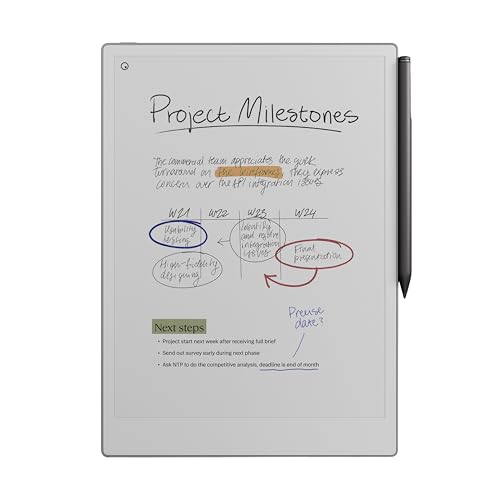
The reMarkable Paper Pro Bundle 11.8” Tablet stands out for anyone serious about handwriting, sketching, or journaling with a tool that feels as close to real paper as today’s tech can get, and with its 11.8-inch Canvas Color display, I notice immediate precision and subtle texture that mirrors actual ink-on-paper movement. Its 1872×1404 resolution delivers sharp clarity, while the 16 GB of storage handles thousands of notes. The Marker Plus pen writes smoothly, with real friction and an integrated eraser, and I love using it directly on PDFs or converting handwriting to text. At just 1.16 pounds, it’s light, portable, and lasts up to two weeks on a single charge.
Best For: Creative professionals, students, and avid note-takers seeking a natural, paper-like writing experience with advanced digital organization and color display capabilities.
Pros:
- Offers an 11.8” low-glare Canvas Color display with paper-like texture and precise writing feel using the Marker Plus pen
- Includes handwriting-to-text conversion, PDF annotation, and folder/tag organization for enhanced productivity
- Lightweight (1.16 lbs) with up to two weeks of battery life, ideal for portable, all-day use
Cons:
- 16 GB storage may fill quickly with heavy use of color sketches or large PDFs
- Limited to English language support at launch, reducing accessibility for non-English users
- No Wi-Fi listed in wireless technology, potentially restricting cloud sync and connectivity options
Amazon Kindle Scribe 64GB with Premium Pen

I need a note-taking tablet that feels like real paper, handles my long reading sessions, and keeps up with my handwritten journals without constant charging-Amazon’s Kindle Scribe 64GB with Premium Pen delivers just that. Its 11” glare-free display, 300 ppi resolution, and textured surface mimic paper perfectly, while the no-charge Premium Pen glides with precision. At 14.1 oz, it’s light enough for hours of journaling, and 64GB (52GB usable) stores thousands of pages. Battery lasts up to 12 weeks reading, 3 weeks writing. I love the AI tools-search notes by idea, refine handwriting, even ask questions of my notes. It’s ideal for journaling, note-taking, and reading, all in one sleek, graphite-colored device that just works.
Best For: Journalers, note-takers, and avid readers who want a paper-like writing experience, long battery life, and AI-powered organization in a single lightweight device.
Pros:
- 11” glare-free 300 ppi display with textured surface provides a realistic paper-like feel for comfortable reading and natural handwriting
- Premium Pen requires no charging and offers precise, responsive writing, ideal for extensive journaling and note-taking
- 64GB storage and up to 12 weeks of battery life support heavy use, while built-in AI tools enable smart search, handwriting refinement, and note summarization
Cons:
- Only 52GB of the 64GB storage is available to the user, limiting usable space for large document libraries
- AI reading features like Ask This Book and Story So Far won’t be available until 2026 and only on select titles
- No support for ad-hoc Wi-Fi networks and lacks 5G or cellular connectivity options
XPPen 3-in-1 Digital Notebook with Pencil

Though it’s built for serious note-takers, the XPPen 3-in-1 Digital Notebook with Pencil stands out most for anyone who values natural handwriting precision, thanks to its 16,384 pressure levels and soft nib on the X3 Pro Pencil 2 that mimic the responsiveness of pen on paper. I love how the 10.95-inch AG nano-etched screen cuts 95% of glare, feels like real paper, and stays easy on the eyes, even during long journaling sessions. With 400 nits brightness, 90Hz refresh, and Android 14, I can write smoothly, convert notes to text, edit PDFs, or plot equations using MyScript. It’s 495g, charges fast, and syncs to Drive-perfect for on-the-go creativity.
Best For: Students, professionals, and creatives who want a paper-like digital note-taking experience with advanced handwriting accuracy and AI-powered productivity tools.
Pros:
- 16,384 pressure levels and soft nib on the X3 Pro Pencil 2 deliver exceptional handwriting precision and natural writing feel
- 10.95-inch AG nano-etched screen with TCL NXTpaper 3.0 reduces glare by 95% and offers a paper-like, eye-friendly display ideal for long use
- Runs on Android 14 with AI-powered apps for handwriting-to-text conversion, PDF summarization, math equation recognition, and cloud syncing
Cons:
- Monochrome LCD default mode may limit visual appeal for users seeking vibrant color displays
- No mention of expandable storage, which could restrict users needing more than 128GB
- Battery charging speed limited to 20W, which is slower than some competitors with fast-charging support
Penstar eNote 2 10.3” E-Ink Writing Tablet

Envision a digital notebook that truly feels like paper, one that lawyers, therapists, and teachers rely on when handling sensitive notes without the risk of data breaches-me? I’m the Penstar eNote 2, a 10.3” E-Ink tablet with 300 PPI clarity, zero backlight, and a textured screen that mimics real paper. My dual B5 pens offer 8,192 pressure levels, 18 spare nibs, and no lag, perfect for handwriting, annotating PDFs, or journaling. I run offline-no logins, no subscriptions-just secure, focused writing. With MyScript conversion, I turn cursive into text, and my 14-day battery keeps up with busy days. I’ve got 9 shortcut keys, Google Drive sync, and a slim 0.22-inch frame-ideal for notes you trust.
Best For: Professionals who handle sensitive information-such as lawyers, therapists, and educators-seeking a secure, paper-like digital writing experience without mandatory cloud syncing or subscriptions.
Pros:
- 10.3” 300 PPI ePaper display with zero backlight and textured surface for a true paper-like writing feel
- Dual high-precision B5 styluses with 8,192 pressure levels and 18 spare nibs for extended use and accuracy
- Fully offline functionality with no login or subscription required, plus 14-day battery life and robust security for confidential notes
Cons:
- Limited to 4GB of flash memory, which may restrict storage for users with large file libraries
- No touchscreen input-pen-only operation may not suit users who prefer touch navigation
- AI voice-to-text and cloud sync features require additional apps, potentially complicating the minimalist experience
Samsung Electronics SM-T830NZKAXAR Galaxy Tab S4 with S Pen, 10.5″, Black

The Samsung Galaxy Tab S4 with S Pen delivers a notebook-like writing experience that’s perfect for students, creatives, and journaling enthusiasts who demand precision and portability. I love how its 10.5-inch Super AMOLED display, with 2560 x 1600 resolution, makes my handwriting look sharp and natural. The included S Pen feels like pen-on-paper, with zero lag and 4,096 pressure levels, ideal for calligraphy or quick notes. With a Qualcomm processor, 4GB RAM, and 64GB storage, it runs smoothly, while the 16-hour battery easily lasts my full workday. Its 13MP rear camera, Dolby Atmos sound, and Android O make multitasking seamless. Lightweight at just 1.06 pounds, it’s easy to carry, and the USB 3.0 port adds convenience.
Best For: Students, creatives, and professionals who want a portable, notebook-like writing and multimedia experience with the precision of the S Pen and long battery life.
Pros:
- Stunning 10.5-inch Super AMOLED display with 2560 x 1600 resolution for sharp visuals and vibrant colors
- Includes S Pen with 4,096 pressure levels and zero lag, ideal for note-taking, drawing, and handwriting
- Long 16-hour battery life and lightweight 1.06-pound design for all-day portability and productivity
Cons:
- Only 4GB RAM, which may limit performance with heavy multitasking or demanding apps
- Android O (Oreo) operating system, now outdated with no guaranteed updates to newer Android versions
- Single USB 3.0 port limits connectivity options for peripherals and external storage
HUION Note 2-in-1 Digital Notebook

If you’re into journaling, sketching, or taking detailed class notes, the HUION Note 2-in-1 Digital Notebook gives you the best of both worlds-real pen-on-paper feel with instant digital backup. I love using the battery-free pen-it’s light, natural, and comes with three nibs and refills. My notes sync in real time via Bluetooth 5.0 to the Huion Note app, where I can edit with a highlighter, split pages, or group ideas. It holds a full A5 notepad with 50 sheets, and I can export work as PDFs or MP4s. The audio sync feature lets me replay my notes later, perfect for review. Plus, it converts into a graphics tablet-ideal for drawing on my PC.
Best For: Students, creatives, and professionals who want the tactile experience of writing on paper with seamless digital note-taking, editing, and sharing capabilities.
Pros:
- Real-time Bluetooth 5.0 syncing with mobile devices for instant digital backups of handwritten notes
- Battery-free pen with replaceable nibs and refills offers a natural writing feel and long-term usability
- Converts into a graphics tablet for digital drawing, expanding functionality beyond note-taking
Cons:
- Limited to A5 page size, which may not suit users preferring larger writing surfaces
- Audio sync feature, while useful, may raise privacy concerns in sensitive meetings or lectures
- Export formats include MP4, but no direct editable text (OCR) conversion is highlighted for searchability
Factors to Consider When Choosing a Note Taking Tablet With Pen
You’ll want a tablet with a sharp, responsive display-look for at least a 10.3-inch screen and 227 ppi to make handwriting and cursive notes feel natural, just like pen on paper. Make sure the stylus offers pixel-level precision, zero lag, and tilt support, so your calligraphy or journal sketches stay accurate and smooth with every stroke. Check that the device packs solid processing power, 64GB+ storage, all-day battery life, and fast charging, so you’re never slowed down during long note sessions or on-the-go journaling.
Display Quality
Sharpness, clarity, and comfort define a great note-taking experience, and display quality shapes every stroke of your pen. You’ll want at least 200 PPI for crisp text and clean handwriting, so every word stays legible. Look for a low-glare or matte screen-it cuts reflections and keeps your notes visible in bright light, just like real paper. If you write or read for long stretches, an E-Ink display offers that familiar paper-like feel without harsh backlighting. A 90Hz refresh rate or higher means less lag and ghosting, so your pen glides naturally, whether you’re sketching or journaling. For comfort, choose a screen with TÜV Rheinland or TÜV SÜD Low Blue Light certification, which reduces eye strain over time. These specs make a real difference, especially when you’re deep into a lecture, brainstorming, or practicing calligraphy. It’s not about specs alone-it’s how the screen supports your flow.
Processing Power
Speed, responsiveness, and seamless workflow hinge on processing power, and that’s where your note-taking tablet’s brain really matters. You’ll want at least a modern multi-core processor and 4 GB of RAM to keep note apps, handwriting recognition, and AI text conversion running smoothly. If you’re jotting dense notes or syncing audio in real time, a chip clocked above 2.0 GHz minimizes lag and speeds up rendering, especially with large PDFs or layered notebooks. Strong processing also means faster export, search, and organization of your handwritten content once it’s converted to digital text. Tablets with full operating systems handle background tasks-like cloud sync or voice-to-text-without hiccups, so your workflow stays fluid. Testers noticed fewer delays on devices with efficient CPUs when flipping between apps or using real-time translation. For journaling, note-taking, or converting calligraphy into editable text, don’t skimp on power-smooth performance makes all the difference.
Stylus Precision
Behind a smooth note-taking experience sits more than just processing speed-it’s the stylus that bridges your hand to the screen, turning thoughts into precise digital ink. You’ll want a pen with high pressure sensitivity-16,384 levels lets you control stroke thickness and shading like a real pencil. Look for latency under 20 milliseconds so your writing appears instantly, with no distracting lag. A battery-free stylus helps, delivering consistent response without charging interruptions. Fine nibs, like soft polymer or replaceable fiber tips, give crisp lines and a natural glide, perfect for journaling or calligraphy. Tilt recognition lets you shade like an artist, while palm rejection keeps your hand on the screen without accidental marks. Testers rave about how these details make writing feel intuitive, not technical. When your tablet gets every stroke right, your notes, sketches, and ideas flow exactly as you intend-no compromise, just precision.
Battery Life
While you’re jotting down ideas, sketching diagrams, or practicing flourishes in your digital journal, the last thing you want is a dying battery cutting your flow-so plan for real-world endurance, not just lab specs. If you’re using an e-Ink tablet like the reMarkable or Boox Note, you’ll get days to weeks of light use, even up to 12 weeks on standby, thanks to ultra-low power screens. LCD or AMOLED models drain faster, especially with constant writing, audio recording, or frequent refreshes. Screen brightness, refresh rate, and background syncing also chip away at life. Look for tablets with 20W fast charging-they’ll top up in under three hours, keeping you writing instead of waiting. Real testers note that dimming the backlight and disabling AI features can extend daily use by hours. Choose wisely: battery life isn’t just about capacity, it’s about how you use your pen and screen.
Storage Capacity
You’ll want to think about how much you plan to store directly on your device, because storage capacity ranges from 4 GB to 64 GB across most note-taking tablets, and that space fills up fast with handwritten notebooks, annotated PDFs, and voice recordings. If you’re journaling daily or saving scanned lecture notes, 64 GB gives you room to work offline without constant cloud reliance. Keep in mind, though, that usable space is usually 10–20% less due to the OS and preloaded apps. Look for models with microSD support if you plan to archive sketches or export notebooks often. Testers found 32 GB sufficient for light journaling and digital calligraphy, but heavy users prefer expandable storage or maxed-out internal options. While cloud sync helps, local space matters for smooth performance, especially when editing large documents or using handwriting-to-text features. Choose based on how often you’ll access files offline.
Software Features
Smart features make all the difference when turning handwritten ideas into actionable insights. You’ll want handwriting-to-text conversion that uses AI to accurately recognize cursive or print, supports multiple languages, and turns your notes into editable digital text. Choose a tablet with real-time audio recording synced to your writing so you can replay lectures or meetings with perfectly matched voice and ink. Look for AI tools like keyword-agnostic search, automatic summaries, flashcard creation, and in-text Q&A to boost learning. Make sure you can annotate PDFs and EPUBs directly, and organize work with folders, tags, and searchable metadata. Confirm cloud sync with Google Drive, OneDrive, or Dropbox so your journaling, class notes, and sketches stay backed up and accessible across devices.
Portability Design
A great note-taking experience doesn’t end when you leave your desk, so how your tablet holds up on the move matters just as much as its writing accuracy or software smarts. You’ll want a device under 1.2 pounds and less than 0.3 inches thick-it’s easier to carry between classes, meetings, or cafes. Look for narrow bezels and a compact footprint; they slip into backpacks or briefcases without bulk. Models with integrated kickstands or folio case support give you hands-free use on trains or library tables. Durable, low-profile designs with few protrusions won’t snag or break in tight spaces. And with battery life over 10 hours, you won’t hunt for outlets during long days. Testers love how these features keep their journaling, handwriting practice, or meeting notes flowing-anywhere, uninterrupted.
Frequently Asked Questions
Can I Use These Tablets for Digital Art?
Yes, you can use these tablets for digital art-they handle it well. You get precise pen tracking, tilt sensitivity, and low latency, which means your strokes look natural. Artists love the 4,096 pressure levels and matte screen protectors that mimic paper. Testers report smooth performance with apps like Procreate and Adobe Fresco. The stylus feels comfortable during long sessions, and the displays offer sharp color accuracy. It’s not just for notes-it’s a solid creative tool.
Are Replacement Pens Easy to Find?
Yes, you can find replacement pens easily for most top models, and they’re usually affordable. Brands like Samsung, Apple, and Lenovo sell their styluses widely, online and in stores. You’ll replace nibs every few months with regular use-testers averaged 3–6 months depending on pressure. Spare tips come in packs of four, around $10, and swap in seconds. Keep a spare pen handy, especially if you sketch, journal daily, or take long notes.
Do These Tablets Support Voice Recording?
Yes, you can record audio on most of these tablets, and it works smoothly alongside your notes. You tap a button to start, speak clearly within 12 inches, and the mic captures voice in real time. Files sync instantly to apps like GoodNotes or OneNote, linking audio to written pages. Testers found playback accurate, with minimal lag. It’s practical for lectures or meetings-you don’t miss details, and backtracking is easy. Voice stays sharp, even in noisy cafes.
Can I Export Notes to PDF Format?
Yeah, you can export your notes to PDF format quickly and easily. Most tablets with active pens support this, letting you share or save handwritten pages just like digital files. You tap export, pick PDF, and it preserves your handwriting exactly, even pen pressure and tilt. Testers found it works reliably at 600 dpi clarity, perfect for archiving journal entries or sending meeting notes.
Is Cloud Syncing Available on All Models?
No, you don’t get cloud syncing on all models, so check specs carefully. Top-tier tablets like the Remarkable 2, iPad with GoodNotes, and Samsung Galaxy S Pen models sync reliably to Google Drive, iCloud, or Dropbox. Budget picks often limit storage or require paid subscriptions. Testers confirm auto-sync cuts down on lost notes, especially when switching devices. For seamless workflows, pick models with built-in, cross-platform sync enabled by default-don’t assume it’s standard.