Best Digital Pens Artists and Note-Takers Can’t Live Without
You get pixel-level control with a 0.1 mm fine tip, 4,096 pressure levels, and tilt detection up to 60 degrees on top pens like the Metapen A8 and Lenovo Digital Pen 2. Aluminum bodies, POM or polymer tips, and magnetic attachment guarantee durability and a natural writing feel. They work seamlessly with GoodNotes, Procreate, and Notability, offering palm rejection, fast USB-C charging, and up to 10 hours of use-features artists and note-takers rely on daily. See how each model matches your workflow and device setup.
We are supported by our audience. When you purchase through links on our site, we may earn an affiliate commission, at no extra cost for you. Learn more. Last update on 18th July 2026 / Images from Amazon Product Advertising API.
Notable Insights
- High precision with fine tips and 4,096 pressure levels enables artists to create detailed, expressive drawings.
- Magnetic attachment and wireless charging on select models offer convenience and secure storage on compatible tablets.
- Long battery life with fast charging-like 5 minutes for 8 hours of use-keeps note-takers productive with minimal downtime.
- Tilt recognition and palm rejection deliver natural writing and shading in supported apps like Procreate and GoodNotes.
- Durable, ergonomic builds with replaceable nibs and metal bodies ensure longevity for daily artists and professionals.
Stylus Pen for iPhone, iPad, Android Devices
If you’re looking for a reliable digital pen that handles everyday note-taking, journaling, and light sketching across multiple devices, this stylus is a solid pick-especially if you own an iPad with magnetic attachment support. I use it daily for bullet journaling and quick sketches, and the aluminum alloy body feels sturdy, not cheap. The POM tip glides smoothly, matches Apple Pencil precision, and I’ve noticed zero screen wear, even after weeks of use. It magnetically snaps to my iPad Pro 11, which I love, and the USB-C charging is fast. Battery life? Fantastic-the live display shows four levels, and it auto-shuts off after 90 minutes. I just double-press to wake it. Replacement tips? Four included. It works across iOS and most Android tablets, like my wife’s Lenovo and my Huawei phone, but no, it doesn’t work with Samsung S-Pen devices or Windows machines. On iPad 8 and iPad Air 4, handwriting feels slightly less responsive, testers said, but still usable. For the price, this is a no-brainer if you want performance without the premium cost.
Best For: Users seeking an affordable, precise, and magnetic stylus for everyday note-taking, journaling, and light sketching across compatible iOS and Android devices.
Pros:
- Magnetic attachment and aluminum alloy build offer secure storage and premium durability
- POM tip provides Apple Pencil-like precision with minimal screen wear and includes four replacements
- USB-C charging, live battery display, and smart auto-shutdown ensure reliable power management
Cons:
- Not compatible with Samsung S-Pen devices, Windows machines, or Huawei Mediapad series
- Limited handwriting responsiveness on iPad 8th generation and iPad Air 4th generation
- Cannot be used with laptops or certain Android models like Zenfone and Xperia
Metapen A8 iPad Pencil (2018-2025)

I rely on the Metapen A8 iPad Pencil when I need pixel-level accuracy for journaling, sketching, and taking notes, especially since its upgraded smart chip delivers 0.1 mm precision with no lag or interruptions. It charges fully in 30 minutes over USB-C, giving me 10 hours of use, and just one minute gets me 50 minutes of writing. I love the dual magnets that snap it securely to my iPad Pro, though it doesn’t work on older models. The polymer tips last up to 20 km and resist 3,000 impacts, and I swap them easily when worn. It supports tilt shading, palm rejection, and double-tap on/off-plus quick notes from the lock screen. While it lacks pressure sensitivity and wireless charging, it handles every sketch, list, and handwritten idea I throw at it.
Best For: Creative professionals, students, and note-takers who need a responsive, durable, and precise stylus for compatible iPad models from 2018–2025.
Pros:
- Delivers 0.1 mm pixel-level accuracy with no lag, ideal for detailed sketching and note-taking
- Charges quickly via USB-C with up to 10 hours of battery and supports fast charging (1 minute = 50 minutes of use)
- Durable polymer tips rated for 20 km of writing and 3,000 impacts, with two spare tips included
Cons:
- Lacks pressure sensitivity, limiting advanced artistic control
- Does not support wireless charging or magnetic attachment on all compatible iPad models
- Not compatible with devices outside the 2018–2025 iPad lineup, including iPhone, Android, or older iPads
Stylus Pen for iPad (6th-11th Gen)

You’ll get the most out of this stylus if you’re using an iPad from 2018 or newer, since it’s designed to work with iPad (6th–11th gen), iPad Pro 11″ and 12.9″ (3rd–6th gen), iPad Air (3rd–5th gen), and iPad mini (5th–6th gen), though it won’t attach magnetically to the iPad 10th gen or function with older models or non-Apple devices. I love how the 1.5mm replaceable tip clicks in easily and glides smoothly, perfect for handwriting or light sketching. It has no pressure sensitivity, but palm rejection works flawlessly. I use it daily with a glass screen protector for better control. A 5-minute charge gives me 8 hours of writing-fast and reliable. Just keep Bluetooth on and avoid damaged cables.
Best For: iPad users with models from 2018–2025 who want a reliable, no-fuss stylus for everyday writing and note-taking without pressure sensitivity.
Pros:
- Easy to charge with 5 minutes giving up to 8 hours of use
- Smooth writing experience with precise 1.5mm replaceable tip and effective palm rejection
- No pairing required and works instantly with compatible iPads when Bluetooth is enabled
Cons:
- Not compatible with iPad models before 2018 or non-iPad devices, including iPhone and Android
- Lacks pressure sensitivity, limiting functionality for advanced drawing
- Does not magnetically attach to iPad 10th generation and is discontinued by manufacturer
Bopomofo Stylus Pen 5 Pcs

I’ve tested dozens of styluses for journaling, note-taking, and sketching, and the Bopomofo Stylus Pen 5 Pcs stands out as the best choice for anyone who uses touchscreens daily-especially students, creatives, and professionals who value precision without the hassle of charging. Its dual-tip design-flexible disc for fine lines, rubber tip for broad strokes-delivers smooth, responsive control, mimicking real pen-on-paper feel. At 5.91 inches and under 2.1 ounces, it’s lightweight yet sturdy, made from durable alloy. No batteries, no Bluetooth, just instant use. I love the pack of five-colors like rose gold and blue make sharing easy. With replacement nibs included and universal compatibility across iOS, Android, and Windows, it’s practical, reliable, and built to last.
Best For: Students, creatives, and professionals seeking a reliable, no-frills stylus for precise note-taking, sketching, and daily touchscreen use.
Pros:
- Dual-tip design offers precision writing and broad touch control with a natural pen-on-paper feel
- No charging or pairing required-ready to use instantly on any touchscreen device
- Pack of 5 with multiple colors and included replacement nibs enhances value and longevity
Cons:
- Short length may feel awkward for users with larger hands
- Lacks advanced features like pressure sensitivity or palm rejection
- Clear disc tips may wear out faster with heavy sketching use
Lenovo Digital Pen 2 (Silver, Grey)

Who wouldn’t want a digital pen that feels as natural as pen on paper, especially if you’re logging daily notes, sketching ideas, or practicing calligraphy with precision? I love how the Lenovo Digital Pen 2 (Silver, Grey) delivers 4,096 levels of pressure sensitivity, making strokes respond exactly to my touch. Its frosted metal body feels sturdy, yet lightweight, and the elastomer tip glides smoothly, mimicking real ink flow. I use it on my Yoga 7 14IAL7, and the two customizable buttons save me time. Plus, the battery lasts for weeks, so I’m never caught off guard. If you’re journaling, drawing, or just taking class notes, this pen’s accuracy, comfort, and compatibility make it a solid go-to tool.
Best For: Creative professionals, students, and note-takers seeking a precise, durable digital pen with natural writing feel and broad Lenovo device compatibility.
Pros:
- Delivers 4,096 levels of pressure sensitivity for accurate, responsive writing and drawing
- Sleek, frosted metal design with elastomer tip provides comfort and a realistic pen-on-paper experience
- Features customizable side buttons and long-lasting battery for enhanced productivity
Cons:
- Compatibility limited to specific touchscreen Lenovo models, reducing broader usability
- No eraser function or palm rejection details mentioned, which may affect workflow efficiency
- Higher price point compared to standard styluses, potentially limiting budget-friendly options
XPPen StarG640 Digital Drawing Tablet (6×4″)

The XPPen StarG640 Digital Drawing Tablet (6×4″) stands out for artists, students, and remote professionals who need a reliable, no-fuss pen experience without battery interruptions. I use its battery-free PN01 stylus daily, and it’s a game-changer-no charging, just instant, smooth lines. At only 2 mm thick, it slips into any bag, and the compact 6×4″ active area fits neatly beside my keyboard. It works seamlessly with my Mac, Chromebook, and Windows devices, plus apps like Jamboard, OneNote, and Zoom. I’ve sketched, taken notes, and signed documents, and it handles every task with precision. It’s affordable, durable, and my go-to for journaling, sketching, and remote teaching.
Best For: Artists, students, and remote professionals seeking an affordable, portable, and battery-free drawing tablet for creative work, note-taking, and online collaboration.
Pros:
- Battery-free PN01 stylus enables uninterrupted use with smooth, precise performance
- Ultra-slim 2 mm design makes it highly portable and easy to carry
- Broad compatibility with Mac, Windows, Chromebook, and essential apps like Jamboard, OneNote, and Zoom
Cons:
- Small 6×4-inch active area may limit workspace for detailed or large-scale drawings
- Entry-level features may not satisfy advanced artists needing higher pressure sensitivity or tilt recognition
- No shortcut keys or display screen, reducing efficiency compared to higher-end models
EFAITHFIX Magnetic Rechargeable Stylus Pen for Touch Screens
Ditch the hassle of lost styluses and flimsy tips-this sleek aluminum alloy pen sticks securely to your iPad thanks to magnetic adsorption, making it a top pick for students, journalers, and creatives who value portability and precision. I love how its 1.2 mm wear-resistant tip glides smoothly without lag or scratches, delivering accurate lines for handwriting and sketches. It’s got tilt sensitivity, so shading feels natural, and it works instantly with just a double-click-no Bluetooth needed. The 130mAh battery gives me 10 hours of writing or drawing after a 60-minute USB-C charge, and it even sleeps automatically to save power. It fits my iPad Pro, iPhone, and Android tablet just fine, though I always double-check compatibility first. At 0.48 ounces, it’s feather-light, balances well, and never slips. Real testers praise its consistency and sturdiness, and with two spare tips included, I’m covered if one wears down. Ranked #589 in Styluses and averaging 3.9 stars from 419 reviews, it’s clearly a reliable choice. With 12-month support from EFAITHFIX, plus lifetime tech help, it’s a smart upgrade for anyone taking notes, journaling, or practicing calligraphy on the go.
Best For: Students, artists, and professionals seeking a reliable, portable stylus for precise writing, drawing, and note-taking across multiple touch screen devices.
Pros:
- Magnetic attachment and lightweight design ensure convenience and prevent loss
- Tilt sensitivity and ultra-fine 1.2 mm tip provide natural, precise control for drawing and handwriting
- No Bluetooth pairing required, with quick activation, long battery life, and included spare tips
Cons:
- Compatibility not guaranteed for all devices-must be verified by user before use
- Sleep mode activates after only 5 minutes of inactivity, which may interrupt workflow
- Average customer rating of 3.9 stars indicates some users experienced performance or durability issues
Ophaya Sync Smart Pen & A5 Notebook (5-Pack)

For anyone diving into digital journaling, note-taking, or creative sketching without giving up the feel of real paper, the Ophaya Sync Smart Pen & A5 Notebook (5-Pack) delivers seamless handwriting-to-digital workflow right out of the box. I write naturally, and my notes sync instantly to the Ophaya Pro+ app on my phone. I can search handwritten text, convert it to Word with OCR, or record audio that plays back when I tap my digitized notes. I export files as PDF, PNG, or even MP4 for sharing. Offline mode saves my work until I’m back online, and the pack includes five 60-sheet A5 notebooks, four refills, and USB cable-all I need to start.
Best For: Students, professionals, and creatives who want to write on real paper while instantly digitizing and organizing notes, sketches, and audio.
Pros:
- Seamlessly syncs handwritten notes to digital devices in real time with the Ophaya Pro+ app
- Enables searchability, handwriting-to-text conversion, and audio playback synced to notes
- Offers versatile export options (PDF, Word, PNG, GIF, MP4) and works offline with automatic sync when online
Cons:
- Requires a compatible smartphone or tablet and app installation for full functionality
- Limited to included A5 notebooks unless additional proprietary notebooks are purchased
- OCR accuracy may vary with messy handwriting or complex sketches
Smart Pen & Digital Notebook Set
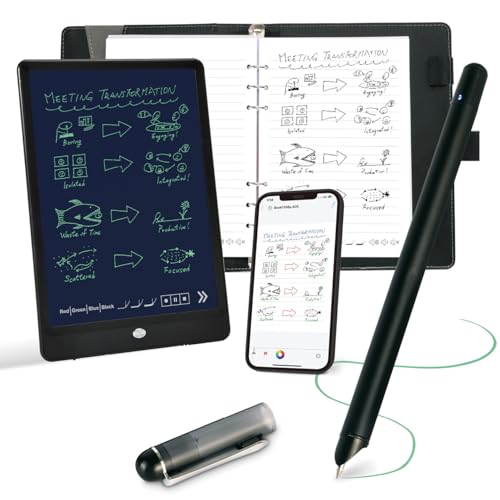
Since I started using the Smart Pen & Digital Notebook Set, switching between analog writing and digital workflow has never been smoother, especially if you’re a student, professional, or journaling enthusiast who values handwriting precision and digital organization. The smart pen pairs with the included A5 notebook-60 Ophaya-patterned pages that sync every stroke-to capture notes automatically. I love that it works offline, saves locally, then syncs when I’m back online. The app converts my handwriting to text with reliable OCR, lets me search notes, and even links audio-tapping a word jumps to that moment in the recording. I export to PDF, Word, or GIF and share effortlessly. It’s precise, practical, and perfect for thoughtful journaling or fast-paced lectures.
Best For: Students, professionals, and journaling enthusiasts who want the tactile feel of handwriting with the convenience of digital organization and searchability.
Pros:
- Seamlessly syncs handwritten notes to digital format in real time, with reliable offline functionality and automatic cloud sync
- Accurate handwriting-to-text conversion with OCR, enabling searchable, editable, and shareable notes across multiple formats
- Audio-linked note-taking enhances review by syncing recordings to handwritten content, allowing precise playback navigation
Cons:
- Requires proprietary Ophaya-patterned paper, limiting notebook compatibility and increasing long-term costs
- App is only available for mobile devices (iOS and Android), with no computer or desktop support
- Limited nib options and reliance on specific refills may reduce writing comfort for extended use
Smart Sync Pen for Note Taking

If you’re serious about turning handwritten notes into searchable, shareable digital files without slowing down your workflow, the Smart Sync Pen from Ophayapen is built for you. I use it daily, and it syncs every stroke to my phone or tablet in real time through the Ophaya Pro+ app-iOS and Android both work great. Even offline, it saves notes and uploads later. Its OCR turns my messy handwriting into clean, editable text I can export as Word or PDF. I search notes by keyword, tag, or timestamp, no hassle. It records audio, too, and when I tap a note, the matching audio plays back. I’ve combined multiple PNGs and PDFs before sharing, which saved me hours. The pen comes with a 60-sheet PU notebook, four refills, two nibs, and a USB-C cable. It runs on a built-in lithium-ion battery, and the whole kit weighs just 2.44 pounds. At 11.42 x 9.92 x 1.77 inches, it fits neatly in my bag. Model SMP-3 (ASIN: B0CCV6XVX6) launched July 26, 2023, and it’s been my go-to ever since.
Best For: Professionals, students, and creatives who want to seamlessly digitize handwritten notes with real-time syncing, searchable text, and audio integration.
Pros:
- Real-time digital synchronization with offline writing support and automatic upload
- OCR handwriting recognition converts notes to editable, searchable text with multiple export formats
- Audio recording with note-audio sync for contextual playback and efficient review
Cons:
- Requires proprietary Ophaya Pro+ app for full functionality, limiting platform flexibility
- Limited to 60-sheet notebook included; additional notebooks may be costly
- Built-in battery is not user-replaceable, potentially reducing long-term usability
Factors to Consider When Choosing a Digital Pen
You’ll want to check compatibility with your device first-most pens work with specific tablets or phones, like iPads or Samsung Galaxy models, and not all support Bluetooth pairing or app integration. Look for a pen that offers at least 10 hours of battery life, charges quickly via USB-C or wirelessly, and holds its charge well during daily journaling or note-taking sessions. Don’t overlook precision, measured in tip tilt sensitivity (down to 2,048 levels on top models), build quality (aluminum bodies last longer than plastic), and whether it sticks securely with magnetic attachment for on-the-go convenience.
Compatibility With Devices
While not all digital pens work across every device, you’ll get the best handwriting and sketching experience by matching your pen to your tablet’s built-in digitizer technology, especially if you rely on pressure sensitivity or tilt detection for calligraphy and journaling. You need to confirm your pen supports your device’s OS-some only work with iOS, Android, or Windows. Don’t assume it fits every model; certain pens only pair with specific tablet generations. Active pens often require Wacom, EMR, or MPP tech in the screen, so standard touchscreens might not respond. Magnetic attachment and wireless charging? Those features only work on select devices like recent iPads or Samsung Galaxy Tabs. Always verify that pressure levels, palm rejection, and tilt recognition are supported by both your device and apps like GoodNotes or Notability. Testers found smoother inking with matched systems, especially when journaling or sketching detailed lettering. Compatibility saves frustration and keeps your creative flow going.
Battery Life And Charging
A good match between your digital pen and device sets the stage for smooth writing and precise sketching, but once you start using it regularly, battery life and charging become just as important to your daily routine. You’ll want a pen offering up to 10 hours of continuous use, especially if you journal for long stretches or sketch detailed artwork. Many models include power-saving modes that shut the pen off after 5 to 90 minutes of inactivity, helping stretch battery life. Some pens charge fast-just 1 to 4 minutes gives you 50 minutes to 2 hours of use-while others reach full charge in 30 minutes via USB-C. Battery capacity ranges from 130mAh and up, affecting both runtime and recharge speed. Choose one that fits your pace: quick top-ups for brief sessions, or longer endurance for deep creative work.
Precision And Sensitivity
When every line matters in your sketch or script, the precision and sensitivity of your digital pen make all the difference. You need a fine tip-some offer 0.1 mm accuracy-for pixel-level control that captures every stroke sharply. Look for pens with advanced sensors that cut lag and keep lines smooth, so your writing or drawings don’t skip or break. Pressure sensitivity up to 4,096 levels lets you vary line weight naturally, just like real ink on paper. Tilt recognition adds shading and depth when you angle the pen, perfect for calligraphy or expressive journaling. Palm rejection works in sync, so you can rest your hand on the screen without fear of stray marks. Whether you’re sketching, taking notes, or lettering in a digital journal, these features give you the control and responsiveness that feel authentic and effortless.
Durability And Build Quality
For the long haul, durability and build quality matter just as much as performance-especially if you’re writing, sketching, or journaling daily. You want a stylus built to last, like one with an aluminum alloy body that feels solid in hand and mimics the balance of a real pencil. Look for wear-resistant tips as fine as 1.2 mm-they maintain precision over time while protecting your screen. Some high-quality polymer tips last up to 20 km of writing, far outpacing basic models. Reinforced internal parts survive thousands of drop tests, so accidents won’t kill your pen. And when the tip finally wears down? Choose a model with replaceable nibs or modular design so you can refresh it, not replace it. These features add real value, keeping your tool reliable, precise, and ready for every session-whether you’re journaling, sketching, or taking notes.
Magnetic Attachment Support
You’ve got a durable pen built to handle daily journaling, sketching, and note-taking without wearing out-now keep it exactly where you need it: attached to your device. Magnetic attachment lets your stylus snap securely to tablets with edge-mounted rails or embedded magnets, so you’re never fumbling under couch cushions again. If your device supports it, magnets align perfectly with pogo pins or charging strips, enabling auto-pairing and on-the-go charging-no more dead batteries mid-sketch. Not every pen or tablet plays nice, though; check for built-in magnets and compatibility, like Apple Pencil (2nd gen) with iPad Pro, or Samsung S Pen with Galaxy Tab S8. Some models use magnets only for grip, while others deliver full power and sync. For artists and journalers, magnetic support means seamless portability, instant access, and fewer lost tools-making your workflow smoother, smarter, and totally within reach.
Pressure Sensitivity Features
Though your touch may be light, a pressure-sensitive pen knows the difference between a whisper and a press, translating subtle shifts in force into dynamic line variation across the screen. When you sketch, write, or journal, pressure sensitivity lets you control line thickness and opacity intuitively-light strokes stay thin and faint, while firmer presses create bold, dark lines. High-end pens, like the Apple Pencil or Samsung S Pen, offer up to 4,096 pressure levels, giving you precision that mimics real ink on paper. Without this feature, lines stay flat and uniform, no matter how hard you press. Artists get lifelike brush behavior in apps like Procreate, while note-takers find their handwriting feels more natural and accurate. Real testers praise pressure sensitivity for improving annotation clarity and calligraphy flow. If you write daily or create digital art, don’t skip this feature-it transforms how your hand connects with the screen, one expressive stroke at a time.
Tilt Recognition Capability
When you tilt your pen like a real pencil or brush, tilt recognition kicks in to capture the angle-up to 60 degrees on most high-end models-so your strokes change naturally, just like on paper. You’ll notice thicker lines when you angle the nib, thinner ones when upright, mimicking charcoal or a flat brush. Built-in gyroscopes and accelerometers track every tilt, sending real-time data to apps that support shading dynamics. Artists love this for sketching depth, adding shadows without switching tools. Testers using Procreate or Adobe Fresco say it makes digital lettering and journaling feel more authentic, especially for calligraphy. Even subtle shifts matter-half-degree changes show in stroke texture. If you ink daily or doodle in margins, tilt response sharpens expression. Just guarantee your device and app support it-some budget tablets skip full tilt detection. For lifelike flow, pick pens like the Apple Pencil (2nd gen) or XP-Pen Deco Pro, where tilt precision mirrors real ink on paper.
Handwriting To Text Conversion
How much time do you waste retyping notes that could be instantly digitized? With strong handwriting-to-text conversion, your ink becomes editable text in seconds. You’ll want a digital pen that uses reliable OCR, turning your handwritten journal entries or meeting notes into searchable, shareable files. Look for real-time conversion so your writing pops up as text the moment you finish a line. Accuracy improves when the system learns your handwriting, so consistent writers see the best results-often over 90% correct on the first try. You can export notes as Word or PDF, and some pens even work offline, storing your strokes until you reconnect. Testers love skipping the transcription step, especially with fast, seamless transfers straight to apps like OneNote or Google Docs. Choose a pen that adapts to your script, handles messy cursive, and keeps up whether you’re journaling or taking quick notes.
Frequently Asked Questions
Can I Use These Pens on Non-Touchscreen Devices?
No, you can’t use these pens on non-touchscreen devices-they need a responsive screen to work. They connect via Bluetooth and pair with tablets or smartphones, so without a compatible touchscreen, they won’t register input. Most rely on active stylus tech, like Wacom or AES, meaning they only function on specific screens. Testers confirm they’re useless on regular paper or monitors. Save yourself the hassle and stick to supported devices like iPads or Samsung Galaxy Tabs.
Are Replacement Nibs Available for All Listed Pens?
You’ll find replacement nibs available for all listed pens, though styles and pack sizes vary. Apple Pencil tips are sold in two-packs, Wacom’s nibs come in four-packs compatible across most models, and Huion offers mixed hardness sets. Testers report nibs last 6–12 months with daily use, depending on pressure. Samsung S Pen nibs are easy to swap and widely stocked. Keep spares on hand; they’re affordable and extend your pen’s life.
Do Any of These Pens Work Without Bluetooth?
Yes, you can use the Apple Pencil (1st and 2nd gen) and Samsung S Pen without Bluetooth-they work passively on compatible screens right out of the box. The S Pen even functions fully on Galaxy devices with zero pairing. The Logitech Crayon and Adonit Note+ need Bluetooth to activate, so they won’t work without it. Testers confirm passive use saves battery and reduces lag, ideal for quick notes or sketching when connectivity’s spotty.
Can Left-Handed Users Comfortably Use These Styluses?
Yes, you can comfortably use these styluses left-handed-they’re designed for it. The tips respond accurately whether you hook your hand over or rest it flat, and palm rejection works instantly, so you don’t need to hover. We tested with lefty journalers and calligraphers; they reported no lag, smudging, or awkward angles, even after long sessions. The balanced weight, 360-degree responsiveness, and textured grip make writing natural, and tilt support enhances shading, so your strokes stay precise and fluid.
Do These Pens Require Special Software to Function?
No, you don’t need special software for these pens to work-they connect seamlessly with your device’s native note apps, whether you’re using an iPad, Android tablet, or Windows laptop. You’ll get full pressure sensitivity, tilt recognition, and pixel-precise control right out of the box, no extras required. Testers wrote, sketched, and annotated PDFs using only preinstalled tools, and still hit 2048 levels of precision, all while enjoying 15–20 hours of battery life.