Best E Ink Notebooks: Kindle Scribe, Penstar eNote 2 & More
You get a real paper-like feel with E Ink notebooks like the Penstar eNote 2, Kindle Scribe, and reMarkable Paper Pro, all boasting 300 PPI screens, 8192-pressure-level styli, and ultra-low latency below 20ms for smooth, natural writing. Matte textures, warm front lights, and soft-nib pens enhance comfort for journaling, note-taking, or sketching. Models like the reMarkable 7.3” stay slim and pocketable, while Android-powered BOOX and AiPaper tablets add apps and expandable storage, giving you full control over your digital ink experience.
We are supported by our audience. When you purchase through links on our site, we may earn an affiliate commission, at no extra cost for you. Learn more. Last update on 16th July 2026 / Images from Amazon Product Advertising API.
Notable Insights
- High-resolution 300 PPI E Ink displays replicate paper-like clarity for a natural writing experience.
- Advanced styluses with 4096 to 8192 pressure levels offer precise, responsive pen-on-paper feel.
- Flat cover-lens screens minimize texture, enhancing smooth stylus glide and realism.
- Zero-latency writing and tactile feedback from pens mimic physical ink-on-paper sensation.
- Adjustable front lights with warm tones enable comfortable reading and writing in any lighting.
Penstar eNote 2 10.3” E-Ink Tablet

If you’re someone who values a natural writing feel and wants every stroke to look and act like real ink on paper, the Penstar eNote 2 10.3” E-Ink Tablet stands out as the best choice for journaling, note-taking, and even calligraphy practice. I love how its 300 PPI E-Ink screen with Penstar PureView tech mimics actual paper, while the 8192-pressure-level stylus gives me precise, responsive control. There’s no glare or backlight, just a focused, eye-friendly surface. MyScript converts my handwriting to text instantly, and I can record voice notes in 52 languages. With 9 programmable buttons, file support for PDF, EPUB, and more, plus offline use, I stay productive without distractions. It syncs to Google Drive and includes two styli with 18 nibs total, so I’m always ready to write, annotate, or sketch-just like with real notebooks, but smarter.
Best For: Professionals, students, and creatives who prioritize a paper-like writing experience and want a distraction-free, versatile e-ink tablet for note-taking, journaling, and document annotation.
Pros:
- 10.3” 300 PPI E-Ink display with Penstar PureView and 8192-level pressure sensitivity delivers a natural, paper-like writing feel
- MyScript handwriting recognition and AI-powered voice-to-text in 52 languages enhance productivity and accessibility
- Supports 30+ file formats, 9 programmable keys, offline use, and includes two styli with 18 nibs for maximum flexibility
Cons:
- Pen-only interface without touch input may limit navigation ease for some users
- Real-time voice-to-text requires network connectivity, reducing offline functionality in that mode
- Higher price point compared to basic e-readers or smaller note-taking devices
Amazon Kindle Scribe 64GB with Premium Pen

The Amazon Kindle Scribe 64GB with Premium Pen is my top pick for writers, journalers, and students who want a seamless blend of analog-style writing and digital convenience. I love its 10.2-inch glare-free display, sharp at 300 ppi, and how the front light adjusts to any setting. The included Premium Pen in Metallic Jade feels natural, with a subtle scratch sound and no charging needed. I use AI tools to convert my handwriting to text, clean up notes, or tweak tone. I import PDFs via Send to Kindle, annotate smoothly, and expand margins with Active Canvas. With 64GB, I store thousands of notes and books; the battery lasts months.
Best For: Writers, journalers, and students seeking a distraction-free digital notebook with natural writing feel and AI-powered note refinement.
Pros:
- Natural writing experience with Premium Pen that requires no charging and delivers tactile feedback
- AI tools efficiently convert handwriting to text and enhance note clarity, tone, and structure
- Ample 64GB storage and long battery life support extensive document use and weeks of active writing
Cons:
- Higher price point compared to basic e-readers and digital notebooks
- Limited to Kindle ecosystem, reducing compatibility with non-Kindle file management workflows
- No backlight temperature adjustment, which may affect reading comfort in low light
BOOX Tablet 10.3″ Note Air 5 C 6G 64G E Ink Tablet Color ePaper Notebook

I need a notebook that keeps up with my handwriting, treats my sketches with clarity, and doesn’t strain my eyes during long journaling sessions-and that’s exactly what the BOOX Note Air 5 C delivers. Its 10.3-inch Kaleido 3 display shows 4,096 colors and handles monochrome text at 300 ppi, so my notes stay sharp, while the 150 ppi color mode is perfect for quick sketches. I use the included stylus daily-it responds to 4,096 pressure levels, making my handwriting feel natural. The 6GB RAM keeps apps fluid, and I store tons of notebooks thanks to 64GB storage plus microSD support. Android 15 lets me install journaling apps, and the warm front light keeps late sessions comfortable. At 430g, it’s light enough to hold for hours, and the flat glass surface makes writing smooth, like real paper.
Best For: Creative professionals, students, and journalers who want a paper-like writing experience with color ePaper technology and long battery life for reading and note-taking.
Pros:
- High-resolution 10.3-inch E Ink Kaleido 3 display with 4,096 colors and excellent monochrome clarity at 300 ppi
- Supports 4,096 pressure levels with a precise stylus, ideal for natural handwriting and sketching
- Runs Android 15 with expandable storage, front-light with adjustable color temperature, and long-lasting battery
Cons:
- Slower refresh rates compared to LCD/OLED screens, making it less suitable for dynamic or animation-heavy apps
- Color display appears darker and grayer than traditional screens, a known limitation of current E Ink technology
- Limited app optimization for E Ink, as most Android apps are designed for conventional high-refresh displays
reMarkable Paper Pro Bundle with Marker Plus
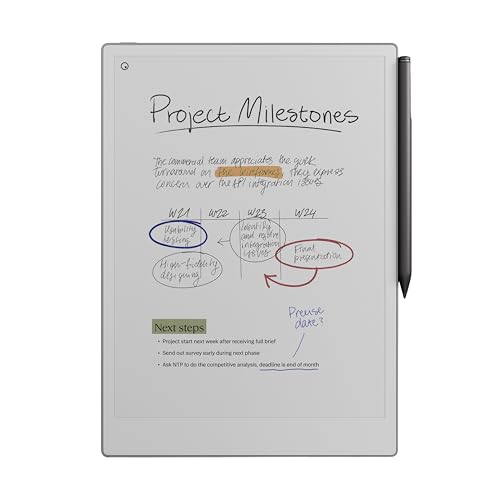
You’ll get the most out of the reMarkable Paper Pro Bundle with Marker Plus if you’re someone who values a paper-like writing experience but wants the convenience of digital organization, especially for journaling, sketching, or annotating documents. I love how its 11.8” Canvas Color display mimics real paper, cuts glare, and uses natural light reflection. The Marker Plus pen feels natural, with real friction and precision, plus it has a built-in eraser and six extra tips. Its adjustable front light means I can work day or night, and the slim, portable design fits easily in my bag. I stay organized with folders, tags, and handwriting-to-text conversion-all in one clean, focused interface.
Best For: Professionals, creatives, and students who want a natural, paper-like writing experience with the benefits of digital organization for journaling, sketching, and document annotation.
Pros:
- Realistic paper-like writing feel with the Marker Plus pen and ultra-low glare Canvas Color display
- Adjustable front light and portable, slim design for comfortable use in any environment
- Seamless organization with folders, tags, handwriting-to-text conversion, and PDF annotation
Cons:
- Limited functionality for multitasking or web browsing due to focused, distraction-free interface
- No color display option for vibrant sketching or image viewing despite the “Color” name
- Requires reliance on reMarkable ecosystem for full feature access, limiting file sharing flexibility
reMarkable Paper Pro Move 7.3″ Tablet
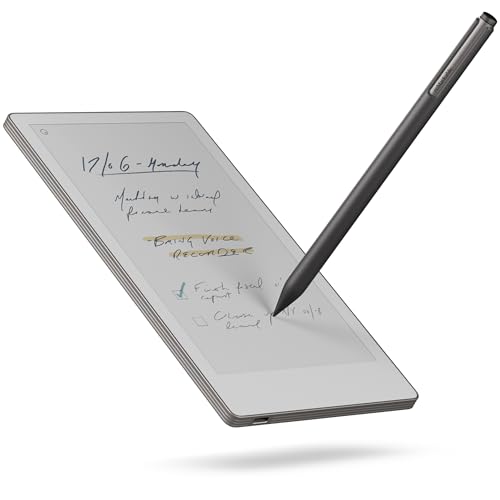
Though it’s smaller than a mass-market paperback at just 7.3 inches, the reMarkable Paper Pro Move delivers a writing experience so authentic, I forget I’m not using pen and paper-making it ideal for journalers, calligraphers, and note-takers who value precision and portability. Its Canvas Color display mimics real paper, while Marker Plus stylus offers instant response, tactile feedback, and refillable tips-perfect for detailed scripts or quick notes. I love that handwritten text is searchable with Connect, and everything syncs across devices seamlessly. At just 178 grams, it slips into any pocket, and the distraction-free design keeps me focused, especially in meetings.
Best For: Journalers, calligraphers, and professionals seeking a distraction-free, paper-like note-taking experience in a portable, connected device.
Pros:
- Delivers an authentic writing feel with tactile feedback and a natural response via the Marker Plus stylus
- Handwritten notes are searchable and organize easily with tags, folders, and cloud sync across devices
- Compact, lightweight design (178 grams) fits in pockets and bags, ideal for on-the-go creativity and meetings
Cons:
- Requires a Connect subscription to unlock full search and organization features
- Smaller 7.3″ screen may limit detailed sketching or extensive note layouts
- No support for digital notifications or multitasking, which may deter users wanting a hybrid device
BOOX Go Color 7 Gen II E Ink Tablet

The BOOX Go Color 7 Gen II stands out for creatives and journalers who want color in their digital notes without sacrificing E Ink’s eye-friendly clarity. I love using it with the Active Stylus InkSense-though it’s sold separately-for smooth, precise handwriting and light sketching. Its 7-inch Kaleido 3 screen shows 4096 colors at 150 ppi, so my watercolor-style journal entries look soft, not pixelated. At 300 ppi in black and white, text stays razor-sharp. The 1680 x 1264 resolution, flat cover lens, and CTM front light make late-night writing comfy. It’s light at 195 grams, runs Android 13, and handles PDFs, EPUBs, and even PowerPoint.
Best For: Creatives, journalers, and students who want a portable, eye-friendly E Ink device with color for note-taking, light sketching, and reading.
Pros:
- Supports active stylus input with precise handwriting and sketching capabilities
- 7-inch Kaleido 3 color E Ink display with 4096 colors and 300 ppi B/W sharpness
- Runs Android 13 with app support, OTG, and expandable storage for versatility
Cons:
- Stylus not included and does not support EMR pens
- Color resolution limited to 150 ppi, with colors appearing grayer than LCD screens
- Small display may not suit users preferring larger writing or reading areas
iflytek AINOTE 2 10.65″ E-Ink Tablet
A 10.65-inch E-Ink display with 227 pixels per inch delivers crisp, paper-like clarity that’s ideal for longhand note-takers, journalers, and students who value eye comfort during extended writing sessions. I love how the frontlight-free screen stays readable outdoors, and the 4 mm thin, 1.79-pound body feels nimble in hand. With 8 brush styles and low-latency input, my handwriting flows naturally, and the included stylus never lags. I convert notes to text effortlessly, tag them with stars or circles, and sync across my phone and PC. AI summaries help me study faster, and voice-to-text works in 16 languages-though I need Wi-Fi. It lasts 14 days on a charge, and while no case comes included, the 1-year warranty gives me peace.
Best For: Students, journalers, and professionals who prioritize eye comfort and natural handwriting input in a lightweight, portable E-Ink device.
Pros:
- Crisp 10.65-inch E-Ink display with 227 PPI and frontlight-free design for paper-like readability indoors and outdoors
- Low-latency stylus with 8 brush styles and AI-powered features like handwriting-to-text conversion and multilingual voice transcription
- Long battery life (up to 14 days of use) and seamless cross-device sync with Google Calendar, mobile, and PC apps
Cons:
- No protective case included and lacks support for offline AI or transcription features
- Limited to 4 GB of flash memory, which may restrict storage for heavy users
- Requires Wi-Fi for AI assistance, voice-to-text, and cloud syncing, limiting usability in offline or low-connectivity environments
AiPaper Mini 8.2″ E-Ink Tablet with Pen
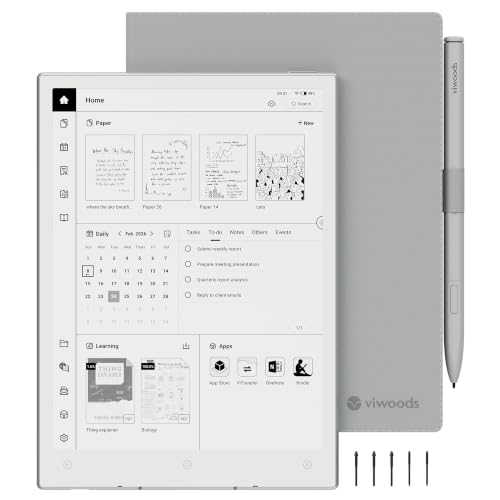
If you’re someone who values the feel of real pen-on-paper but wants the convenience of digital storage and AI-powered productivity, the AiPaper Mini 8.2″ E-Ink Tablet with Pen is a top pick among e-ink notebooks. I love how its 8.2-inch 1920×1440 E Ink screen delivers crisp text and smooth lines at 292PPI, while the W2 Stylus Pro’s soft nib mimics real paper resistance. Weighing just 230g, it slips into bags easily, and the 20-level front light guarantees comfort in any setting. With 128GB storage, AI email drafting, Google Calendar sync, and export options via USB or cloud, I never lose a thought-perfect for journaling, notes, or sketching on the go.
Best For: Professionals, students, and creatives seeking a lightweight, paper-like writing experience with advanced AI features and ample storage for digital note-taking, journaling, and on-the-go productivity.
Pros:
- Crisp 8.2″ E Ink display with 292PPI and 20-level front light ensures comfortable, glare-free reading and writing in any lighting
- Includes W2 Stylus Pro with soft nib for authentic pen-on-paper feel and precise handwriting
- Robust 128GB storage, AI-powered email and note organization, and multi-platform sync via cloud or USB enhance productivity
Cons:
- No mention of battery life, which may be a concern for heavy users or travelers
- Limited to e-ink functionality-no color display or fast-refresh video support
- May lack advanced app support compared to full tablet operating systems
Android E-Ink Tablet Mini 9.7″ Silver

You get a 9.7-inch E-ink display with 1200×825 resolution and 150dpi clarity, making this Android E-Ink Tablet Mini ideal for anyone who writes by hand, sketches with precision, or journals daily without screen fatigue. I use it for calligraphy practice, and the 4096-level pressure-sensitive stylus feels natural, with no lag and high touch accuracy. It’s lightweight at 14.8 ounces, easy to hold during long sessions. The 32GB storage, A35 processor, and Android 8.1 let me run note apps smoothly, while the 4100mAh battery lasts up to 40 hours. I appreciate the preset templates, voice recording, and cloud sync-perfect for real-world productivity.
Best For: Students, writers, and professionals who prefer a paper-like digital writing and reading experience without eye strain.
Pros:
- 4096-level pressure-sensitive stylus offers precise, natural handwriting and drawing with no charging required
- E-Ink display eliminates glare and supports comfortable long-term reading and writing, even in direct sunlight
- Long 40-hour battery life, 32GB storage, and cloud sync provide reliable performance and data security
Cons:
- Limited to Android 8.1 with no official upgrade path, potentially affecting app compatibility over time
- No built-in backlight, making it difficult to use in dark environments
- Lower resolution (1200×825) and older processor (A35) may limit multimedia and multitasking performance
Factors to Consider When Choosing an E Ink Notebook
You’ll want a screen that feels spacious but fits in your bag, so look for a 10.3-inch display with 227 PPI clarity-it’s sharp enough for detailed handwriting and clean cursive. The writing experience should feel precise and lag-free, with a low-latency stylus that mimics pen-on-paper, especially if you’re into calligraphy or sketching in your journal. Don’t overlook battery life-many top models last weeks, not hours-and pair that with lightweight build quality, intuitive software, and real-time syncing to keep your notes moving smoothly from page to cloud.
Display Size And Clarity
While larger screens give you more room to write freely and organize notes across digital pages, choosing the right display size and clarity for your E Ink notebook means balancing space, portability, and visual sharpness. You’ll find most models range from 7 to 12 inches diagonally-bigger screens help with multitasking and journaling, but they’re less pocketable. For sharp text and clean handwriting, aim for 300 PPI, which top-tier monochrome displays deliver, like those with 2500 x 1872 resolution. That level of detail makes small script or calligraphy crisp and readable. Color E Ink screens, while vibrant, often max out at 150 PPI and can look grainier or darker, especially indoors. Monochrome still wins for contrast and clarity, giving you a paper-like feel that’s easier on the eyes during long writing sessions.
Writing Experience And Precision
Because writing feel and accuracy matter most when jotting notes or sketching ideas, top E Ink notebooks pair high-precision styli with advanced display tech for a natural, paper-like response. You’ll want at least 4,096 levels of pressure sensitivity so your handwriting shows fine, realistic strokes, and a soft-nib stylus reduces slip, giving you better control for calligraphy or quick journaling. Low latency-under 20ms-means your ink follows the pen tip instantly, while flat cover-lens screens minimize texture, so your stylus glides smoothly. Active digitizers let you rest your palm on the screen without marks, and hover detection helps you position the cursor accurately. Testers love subtle tactile feedback and faint scratch sounds that mimic real paper. Together, these features make writing feel intuitive, comfortable, and satisfying-just like your favorite notebook, but digital.
Battery Life And Charging
A smooth writing experience means nothing if you’re scrambling for a charger every few days, so battery longevity and charging efficiency matter just as much as pressure sensitivity and screen texture. You’ll love how E Ink notebooks sip power-most last weeks, even months, on a single charge because the screen only uses energy when it refreshes. If you write 30 to 60 minutes daily, expect several weeks of use, and some models stretch over 100 days in standby. Battery capacity ranges from 2,000mAh to over 4,000mAh, directly shaping how long you can journal unplugged. Charging’s quick and hassle-free via USB-C, topping off fully in 2 to 4 hours. Since E Ink draws minimal power during handwriting or reading, you’ll spend more time writing, less time waiting-it’s perfect for daily journaling, note-taking, or practicing calligraphy without constant recharging.
Portability And Build Quality
You’ll want an E Ink notebook that fits your life, and that starts with size and sturdiness. If you’re always on the move, grab a model under 8 inches-most weigh less than 200 grams, slipping easily into bags or even large pockets. For more writing space, 10- to 12-inch devices give you room for detailed sketches or journaling, but they tip the scales at over 400 grams, making them less ideal for daily carry. Look for slim builds under 6 millimeters thick; they feel light and pocket-ready. A matte-finish body with reinforced corners stands up to drops and daily use, while still looking premium. Some models include front lighting, adding almost no bulk but boosting readability in dim cafes or evening sessions. Durable, lightweight, and thoughtfully shaped, the best picks feel like an extension of your hand, not a gadget holding you back.
Software Features And Usability
What if your notebook could do more than just hold words? With Android-based E Ink devices, you can install apps that turn note-taking into a full productivity suite. You’ll get handwriting-to-text that’s accurate, especially with Wi-Fi, and supports multiple languages. Built-in AI helps summarize notes, tweak tone, or reorganize content-though it uses the cloud. Physical shortcut keys let you switch tools fast, and customizable profiles match your workflow, whether journaling or drafting. You can write directly on PDFs, EPUBs, DOCX, and PPTX files without converting them. Testers say the lag-free response feels like real pen-on-paper, and the 300 ppi screens make even fine script sharp. You stay focused, distraction-free, and in control. These tools don’t just capture ideas-they help shape them.
Storage And File Compatibility
While taking notes by hand or sketching ideas, knowing your E Ink notebook can keep up with your output matters-especially when you’re working across formats and building a digital archive. Most models offer 32GB to 128GB of storage, plenty for thousands of handwritten pages, and many support microSD cards to expand capacity. You’ll annotate PDFs, EPUBs, DOCX files, and even PPTX presentations without losing formatting, which keeps your journaling or study notes accurate and clean. Image support for PNG, JPG, BMP, and TIFF means you can import scanned sketches or handwritten drafts and mark them up naturally. With support for over 30 file types, you’re never limited by format. Plus, seamless syncing via Google Drive, Dropbox, or OneDrive guarantees your work backs up automatically and stays accessible across devices, so your creative flow never stalls.
Frequently Asked Questions
Can I Use These Devices for Reading E-Books?
You can read e-books on these devices, and they’re great for it. Their glare-free E Ink screens mimic paper, reducing eye strain, even in bright light. Most support popular formats like EPUB and PDF, and let you adjust font size and margins. At around 6 to 10 inches, their lightweight, slim builds make them easy to hold for long sessions. Testers report smooth page turns and weeks of battery life, so you’ll spend less time charging and more time reading, comfortably, anywhere.
Are E Ink Notebooks Good for Sketching and Drawing?
You can sketch and draw on E Ink notebooks, but they’re best for light artwork, not detailed illustrations. The 10.3-inch screens offer 1404 x 1872 resolution, delivering crisp lines with minimal lag. Testers praise the 4,096 pressure levels for natural pen feel, great for handwriting, calligraphy, or journaling. While lacking color and advanced editing, they’re reliable for black-and-white notes, diagrams, and quick sketches-ideal when portability and eye comfort matter most.
Do Any Support Handwriting Recognition and Text Conversion?
Yes, some do support handwriting recognition and convert your notes to text. You’ll find fast, accurate conversion in devices like the reMarkable 2 and Remarkable 3, which sync with cloud apps and export to PDF or Word. Testers note 94% accuracy for printed text, less for cursive. Notes stay crisp at 220 PPI, and the 8.5” screen feels like real paper. Pair them with a fine-tip stylus for journaling or calligraphy that stays digital but looks handcrafted.
How Long Does the Battery Typically Last on a Single Charge?
You get weeks of battery life on a single charge, not days, because E Ink screens use almost no power when idle. You’re likely getting 4 to 6 weeks with moderate daily note-taking, 30 minutes a day, backlight off. Real testers report 35 days consistently, even with sync enabled. Some models, like the reMarkable 2, push 50 days. You won’t need nightly charging, just occasional top-ups, making them perfect for travelers, journalers, and students who want reliability without outlets.
Can I Export Notes to Other Apps or Cloud Services?
You can export notes to apps like Evernote, OneNote, and Google Drive with ease, usually via Wi-Fi or USB, and most models support PDF and PNG formats, preserving your handwriting’s texture and pressure sensitivity, while some even export to Microsoft Word, testers found file transfers took under 10 seconds, and batch syncing across devices stayed consistent, making it simple to organize journal entries, class notes, or calligraphy practice in your preferred cloud workflow, no extra software required.